
Reverse Face Search Results Timeline And Safe Next Steps
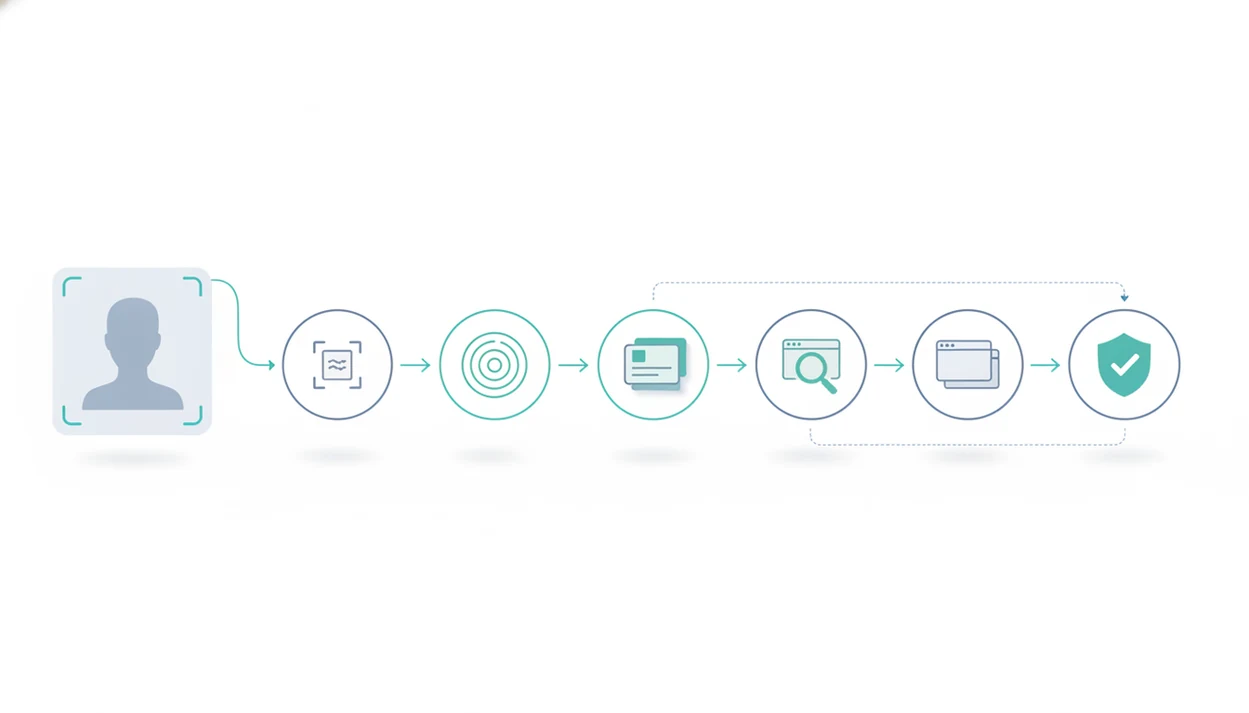
A reverse face search results timeline is the sequence from photo upload to match review, source verification, and safe follow-up action. Expect a quick first pass, broader scanning, ranked possible matches, manual review, and a final decision about whether the result is legitimate, suspicious, or inconclusive.
> A reverse face search results timeline is the step-by-step process a face search app follows to compare an uploaded face photo against online image sources and help a user interpret possible matches safely.
- Early face search results can appear in seconds, but they are not always complete or correct.
- Results should be sorted into same-photo matches, same-face different-photo matches, and likely false positives before taking action.
- The safest next step is to verify the source, context, date, and profile behavior before contacting anyone or reporting misuse.
Reverse Face Search Results Timeline Definition
A reverse face search results timeline starts when you upload a face photo and ends when you decide what to do next based on verified context. The result is a possible match, not proof of identity.
In practice, the timeline covers upload, face detection, ranking, source review, and a safety decision. A glossy profile portrait beside a low-resolution repost on an old public page may look persuasive at first, but the source trail matters more than the visual jolt.
Face Search App is a face search app that explains how to find people by photo, compare reverse face search tools, and check scam photos for everyday users. This guide focuses on public web results, scam-photo checks, profile verification, and privacy-aware use. Good face search app guides for finding people by photo, reverse face search, social profile lookup, and scam-photo checks deliver source-aware verification, not instant identity certainty.
Reverse Face Search Matching Signals Behind The Timeline
Reverse face search works by detecting a face, checking image quality, cropping the face area, and converting it into a mathematical face embedding. A face embedding is a compact numeric pattern, not a name or profile.
That embedding can support similarity search, but it does not verify a legal name, account ownership, consent, or intent. Those facts come only from source review and surrounding context.
The tool compares that embedding against image indexes, public webpages, social-style profiles, and other available sources. Some systems also use duplicate-image detection, page metadata, image sharpness, and source relevance when ranking results. That is why the top result can be useful but still wrong.
Modern matching can be strong under controlled conditions. A 2022 NIST evaluation reported false non-match rates below 0.01 at specific operating points for some modern algorithms, showing real capability when settings and image quality are favorable source. NIST also reported that top face recognition algorithms improved dramatically between 2014 and 2018, including about a 20-fold accuracy gain for some search tasks source. Still, public-photo search adds messy context: filters, reposts, old avatars, and partial faces.
Context changes everything.
Five Face Search Timeline Facts Before You Upload
- Face search tools compare mathematical representations of faces, not human-readable names.
- First-pass results may appear quickly, while broader checks can take longer.
- Similarity-ranked matches require human review because look-alikes, reused photos, and cropped reposts happen.
- Reputable tools should encourage permission-based uploads and limited retention of uploaded images.
- The final stage should be a safety review before contacting, reporting, or accusing anyone.
A Pew Research Center survey in 2019 found that 56% of U.S. adults considered social media facial recognition that automatically identifies people in photos unacceptable source. That privacy concern should shape how you upload, save, and share results.
On a rainy bus ride checking a new match, it is tempting to treat the first hit as an answer. Don’t. For cautious users, a face search timeline is often safer than a one-click verdict because it separates visual similarity from source verification.
Five-Step Face Search Timeline From Upload To Review
Use this face search timeline when you want a structured review instead of a rushed conclusion.
- Upload a clear, permission-based face photo, ideally front-facing and not heavily filtered.
- Wait for first-pass matches, then allow deeper scans or re-ranking to finish when the tool offers them.
- Sort results into same-photo matches, same-face different-photo matches, and weak look-alikes.
- Verify the profile context, source domain, image reuse, dates, captions, and surrounding page details.
- Decide whether to ignore the result, save notes, report a scam, request removal, or seek help.
When we test a result, we often open three browser tabs: the original profile, the search result, and the platform help page. That small habit slows down snap judgments. The broader reverse face search guide explains the search workflow before the timeline begins.
Step 1: Photo Upload And Face Search Quality Check
Upload should start with permission. Use your own photo, a photo you are allowed to check, or an image tied to a legitimate safety concern, such as suspected impersonation or scam-photo reuse.
Clear front-facing images usually perform better than blurry, filtered, cropped, group, or heavily angled photos. Some tools detect the face area automatically, reject low-quality images, or ask you to crop tighter around the face. We often crop out a group-photo shoulder or café background before running a face-focused search, because extra visual clutter can weaken the review.
Privacy-aware tools should explain secure processing, minimization, and deletion policies where stated by the provider. Watch for camera roll permission prompts before upload, especially on mobile. Avoid covert surveillance, doxxing, harassment, or attempts to identify private individuals without a legitimate safety reason.
Step 2: First-Pass Face Search Matches And Ranking Signals
Do first face search matches prove who someone is? No. First matches are early leads because the tool often checks high-confidence or already indexed image sources before broader scans finish.
Treat seconds-fast results as a preview, not the finished timeline. If the interface shows pending scans, duplicate clustering, or updated rankings, wait before saving conclusions.
Ranking may reflect facial similarity, image quality, duplicate detection, source relevance, and sometimes page metadata. An exact same image may appear first. So might a cropped version, a possible same person in a different photo, or an unrelated look-alike with similar lighting and pose.
Tiny faces mislead.
Results can also shift as broader scans finish or the tool re-ranks duplicate pages. A uniformed portrait with a mismatched backdrop may look official, then later appear on several unrelated profiles. If you are comparing general image tools with face-specific tools, the reverse image search vs face search breakdown helps explain why early results differ.
Step 3: Face Search Result Review Categories
Sort every face search result before acting. The category matters because a reused image, a true public profile, and a weak look-alike require different next steps.
| Result category | What it means | Confidence level | Recommended next step |
|---|---|---|---|
| Same-photo match | The same image, or a cropped version, appears elsewhere online. | Medium | Check source context, upload date, captions, and whether the image is reused across unrelated accounts. |
| Same-face different-photo match | The person appears to resemble the uploaded face in another public image. | Medium to higher | Confirm through source trail, name consistency, dates, and profile history before treating it as meaningful. |
| False positive or look-alike | The result looks similar but may be an unrelated person. | Low | Do not contact, accuse, expose, or report based on this result alone. |
A same-photo match can mean reposting, profile reuse, marketing use, or stolen scam imagery. Same-face different-photo matches can be stronger identity clues, but they still need source confirmation. For photo-specific scam patterns, a romance scammer photo search workflow can help separate reuse from coincidence.
Step 4: Source Verification In A Face Search Timeline
Source verification is the stage where a possible match becomes meaningful, misleading, or too weak to use. Open the source page and inspect the surrounding profile, article, or image page before deciding anything.
Compare names, dates, captions, locations, repeated image use, and biography details. Index dates, crawl dates, upload dates, and photo-taken dates can all differ. A result page might show when the search tool found the image, not when the person posted it.
For scam-photo checks, look for inconsistent biographies, reused glamour photos, crypto or romance pressure, copied bios, and profiles with little history. We like saving a screenshot with the date visible before a result page changes. The U.S. Government Accountability Office reported in 2021 that at least 20 federal agencies used or planned to use facial recognition, which shows why understanding source context and system limits matters source. Escalate safely: report to the platform, request removal through the host, or contact authorities for threats or fraud.
Common Face Search Timeline Mistakes
These mistakes cause most bad face search decisions:
- Instant-complete mistake: treating early results as the full search.
- Top-result mistake: assuming the highest-ranked match is the correct person.
- Private-profile mistake: believing reverse face search can see locked accounts or login-only pages.
- Storage-assumption mistake: assuming every uploaded image is permanently stored, although users still need to read each provider’s policy.
- Weak-match escalation mistake: contacting, accusing, or exposing someone based on one uncertain result.
Require at least source context plus visual match quality before deciding a result is meaningful. A comparison spreadsheet with privacy notes can feel tedious, but it prevents overreacting to a free result that ends at a paywall. Tools like Face Search App, Google Lens, TinEye, PimEyes, and Social Catfish vary in coverage, cost, and privacy tradeoffs.
Limitations
Reverse face search can help organize public-photo clues, but it cannot deliver complete web coverage or guaranteed identity answers.
- It cannot search every page on the open web.
- Private accounts, login-only pages, unindexed sites, deleted images, and restricted platforms may not appear.
- False positives can occur, especially with blurry, filtered, obscured, old, or low-resolution photos.
- Results may reflect crawl or index timing, not the original upload date or photo-taken date.
- Ethical tools may limit retention, search categories, or certain use cases, which can make results feel less complete.
- Face search should not be used for stalking, doxxing, harassment, or bypassing privacy controls.
- A no-result timeline does not prove the person or photo is not online.
- Similar faces across age, lighting, makeup, or camera angle can produce misleading matches.
For budget-aware checks, a free reverse face lookup can be useful, but free results often need more manual verification.
FAQ
How long does face search take?
Early face search matches can appear in seconds, while broader scans may take longer depending on index size, image quality, and tool design. A reverse face search results timeline should treat early matches as partial until review is complete.
Are first face matches accurate?
First face matches may be useful, but they are not proof of identity. Manual review and source verification are still required before taking action.
What happens after face search?
After face search, you sort matches, verify source pages, check for scam signals, and choose a safe next step. That may mean ignoring the result, saving notes, reporting misuse, or requesting removal.
Can face search find private profiles?
Reputable tools cannot bypass private profiles, locked accounts, login-only pages, or platform privacy controls. Face Search App and similar guides should frame results around publicly available image sources.
Why do face results change?
Face results can change because deeper scans finish, rankings update, new pages are indexed, duplicates are removed, or source pages change. A saved screenshot with the date visible can help document what you saw.
What is a false positive in face search?
A false positive is a look-alike or unrelated result that appears visually similar but is not the same person. Weak matches should not be used to contact, report, accuse, or expose anyone.
Should I contact someone from a face search match?
Use caution before contacting anyone from a face search match, especially when the evidence is weak or the context is unclear. If there are scam, threat, or impersonation signs, reporting through the platform is usually safer than direct contact.